
Why Does AI Love Writing React So Much?
The other day at the office, we sat down with our coffee to build our next product. We gave the AI a few simple prompts, sat back, and…
The other day at the office, we sat down with our coffee to build our next product. We gave the AI a few simple prompts, sat back, and watched it generate the code line by line.
But as soon as the screen lit up, we noticed something funny. Even though we did not ask for a specific framework, the AI started with the exact same line every single time: import React from 'react'.
Why does this happen? Svelte is lightweight, Vue is highly flexible, and plain HTML/CSS is beautifully simple. So why is AI completely obsessed with building the digital world using React and Tailwind CSS?
This is not just a popularity contest. There are very logical reasons behind this choice, deeply connected to how AI "thinks" and how we design software to lower cognitive load. Let's look behind the scenes.
1. It Plays Safe: Data Abundance
Large Language Models (LLMs) are essentially prediction machines. They look for the highest probability of success based on what they already know.
In the open-source world, React is the absolute king. It has over a decade of GitHub repositories, Stack Overflow discussions, and massive documentation libraries.
For an AI, writing React is like speaking its native language. It feels confident because it has millions of working examples to copy from. The risk of making a mistake or creating a fake function (hallucination) drops to almost zero.
2. Thinking in Small Pieces: The Context Window
AI agents do not look at a project as one giant picture. They process information in small chunks because they are limited by a "context window."
 AI generated image
React's component-driven architecture fits this way of thinking perfectly. Instead of writing one huge, confusing file, the AI breaks the user interface down into tiny modules: Button.tsx, Sidebar.tsx, and ChartCard.tsx (ideally).
It is much easier for the AI to create, test, and fix these small pieces one by one. If there is a bug, the AI does not need to rewrite the whole page. It just goes inside the tiny component, fixes it, and saves time and computational tokens.
3. Tailwind CSS: No More Jumping Between Files
If you notice, AI almost always pairs React with Tailwind CSS. AI tools hate creating separate .css or .scss files.
 AI generated image
Why? Because writing HTML in one file and styling it in another file forces the AI to remember two different things at the same time. This context switching causes errors.
Tailwind CSS fixes this easily by putting the styles directly inside the component.
import React from 'react';

export const CalmNotificationBadge = ({ count = 5 }) => {
  return (
    <div className="flex items-center space-x-2 p-2 rounded-lg bg-slate-50 border border-slate-100">
      <span className="relative flex h-2 w-2">
        <span className="animate-ping absolute inline-flex h-full w-full rounded-full bg-sky-400 opacity-75"></span>
        <span className="relative inline-flex rounded-full h-2 w-2 bg-sky-500"></span>
      </span>
      <span className="text-xs font-medium text-slate-600">{count} new notifications</span>
    </div>
  );
};
When everything is generated in one single stream of text, the AI can deliver clean, working code without any unexpected style bugs.
What does one single stream of text actually mean?
Think of AI as a very fast writer. When it writes code, it moves forward in a single line-like a train on a track. It generates text character by character, which we call streaming. If you ask AI to write old-school HTML and CSS, it has to jump between different files. It creates an index.html file, types a class name, closes it, opens a style.css file, and tries to remember what it just typed. This jumping around is called context switching, and it is exactly where AI makes silly mistakes-like a typo in a style name that breaks the whole design. But with React and Tailwind, the AI never has to open a second file. It writes the structure, the logic, and the visual style all at the exact same time, in one single breath:
// The AI writes this in one smooth line without stopping:
<div className="bg-slate-50 border border-slate-100 p-4 rounded-xl shadow-sm">
Because everything is baked into one single text stream, there are no separate files to break. The code comes out clean and just works on the very first try.
4. JSX is a Predictable Visual Map
Using plain JavaScript to change the DOM (document.createElement) is a nightmare for AI. It is very hard for a machine to guess how the final page will look.
JSX solves this because it works like a visual and logical map. When an AI looks at JSX, it easily understands exactly where a button sits, how data moves down, and how the screen changes when a user clicks something. This predictability allows the AI to keep up with high-quality user experience (UX) standards.
5. TypeScript acts as Guardrails for the Code Train
If React and Tailwind give the AI a smooth track to run on, TypeScript provides the strict guardrails that keep it from crashing.
For an LLM, plain JavaScript can sometimes feel like walking in the dark-it is easy to forget what a variable contains or what shape an object has. But TypeScript changes the game. By using explicit types and interfaces, we give the AI a rigid set of rules. The AI "knows" that the compiler is watching, which significantly drops its margin of error. It doesn't have to guess what properties a UserCard component expects; the types tell it exactly what to write, turning a high-probability guess into absolute certainty.
The Other Side of the Coin
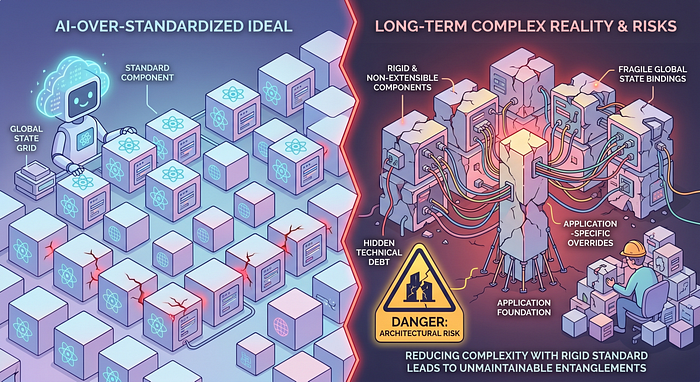
So far, we have looked at why AI models absolutely love React and Tailwind. The engineering and UX benefits are very clear. However, completely relying on AI to generate your tech stack comes with significant risks, long-term technical debt, and architectural limitations.
While AI is amazing at generating small, working components-like an isolated button or a clean user card-it heavily struggles with the bigger picture. When thousands of these tiny pieces need to communicate in a large application, managing global state and data flow becomes incredibly messy for an LLM.
Without careful human supervision, those clean, modular components can quickly turn into an unmaintainable architectural maze.
To prevent your automated codebase from becoming a tangled puzzle, product teams must watch out for three critical issues:
- The "Copy-Paste" Design Trap: Because AI generates code based on high-probability patterns, it creates layouts that look like everything else on the internet. It gives you standardization, but it kills unique design innovation. Your SaaS product risks looking like a clone of thousands of other platforms.
- The Component Explosion: AI loves creating new files for everything. Over time, you can end up with hundreds of repetitive, isolated React components that share no central logic. This makes future updates a nightmare for human developers.
- The Global State Blindspot: AI handles what happens inside a single component beautifully because local state (useState) is isolated and easy to predict. But it completely fails to see the macro-level data flow across an entire platform. LLMs struggle to simulate how data moves through global stores (like Redux or Zustand) and often misjudge the complex side effects of asynchronous API calls. It might fix a bug in a local dropdown component, completely blind to the fact that its "fix" just triggered an infinite re-render loop in a dashboard on the other side of the application. This architectural blindness is what causes massive lag and technical debt in complex B2B platforms.
We believe that true product strategy is not just about using the latest automated tools. It is about deeply understanding their limits and managing the trade-offs. AI can write your code, but humans must still architect your product.
 AI generated image
The Strategic Takeaway for Product Teams
The fact that AI loves React does not mean other frameworks are useless. But it teaches us a massive lesson about the future of software development: Standardization is your biggest leverage.
We are entering a hybrid era where human designers and AI agents build products together. This means we should start writing code that is easy for machines to read, too. To reduce technical debt and scale faster, keep these simple rules in mind:
- Keep your components small, modular, and focused on a single job.
- Use utility-first frameworks to avoid messy, separate style sheets.
- Use TypeScript to give the AI clear definitions, which prevents bugs during rewrites.
At the end of the day, AI does not choose the most complex technology; it chooses the one that is the most predictable and easy to control.
Do you like the code AI generates for your projects? Have you ever tried to force your AI tool to write with a specific framework except React and Tailwind CSS? What happened?
Let's talk in the comments below!
Appibara is a London and Istanbul-based design and software studio. We specialize in high-performance B2B SaaS product design and scalable engineering.
Originally published at https://www.linkedin.com.