
Figma Config India 2026: Code Layers, Specs and What They Mean for Design Systems
At Config India on October 15, 2026, Figma moved code layers into open beta and launched Specs, a Markdown format that both people and AI agents can read. Here is what that means for design systems.
At Config India on October 15, 2026, Figma moved code layers into open beta and launched Specs, a Markdown format that both people and AI agents can read. Together they change who a design file is written for. It is no longer only the developer who reads your design system. Increasingly, it is an agent.
What happened at Config India
Figma held its first Config event in India in Bengaluru. The company called it its largest international conference, with more than 30,000 people registered in person and online (TechBooky). India is Figma's largest market by users outside the United States, and the company says 40% of the top 100 companies on the Bombay Stock Exchange use its platform (Dataconomy).
The announcements were not about prettier tools. They were about context: where design decisions live, who can read them, and how they travel into code. For anyone who has spent time building a design system, that is the interesting part.
What Figma announced
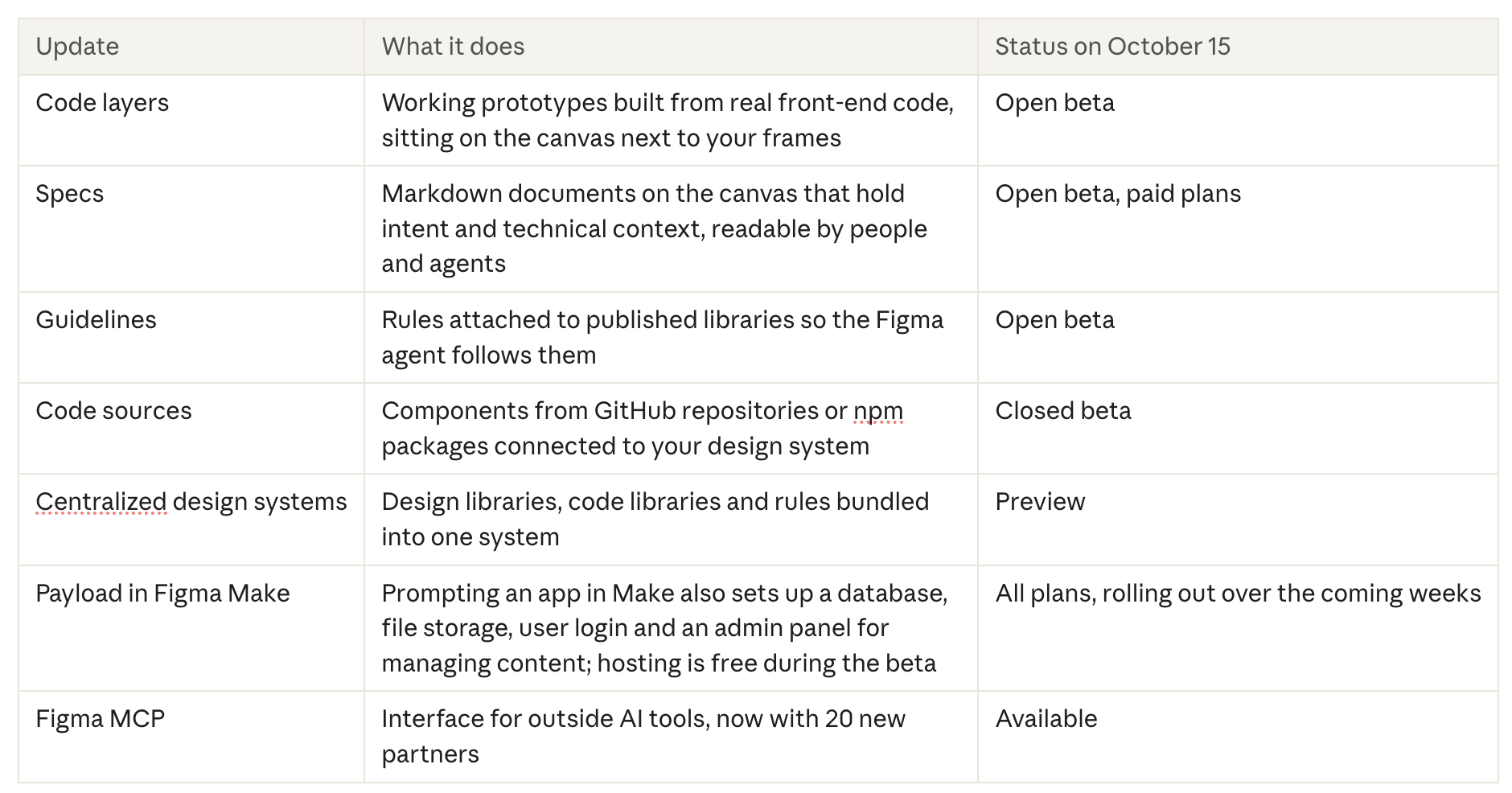
Figma shipped seven updates at Config India. Code layers and Specs are the headline items; the rest quietly matter more for design systems.
 Source: https://blocksandcolors.de/en/blog/figma-code-layers
Compiled from Figma's announcements on code layers, Specs and Payload, plus TechBooky and blocks&colors, both citing Figma's release notes.
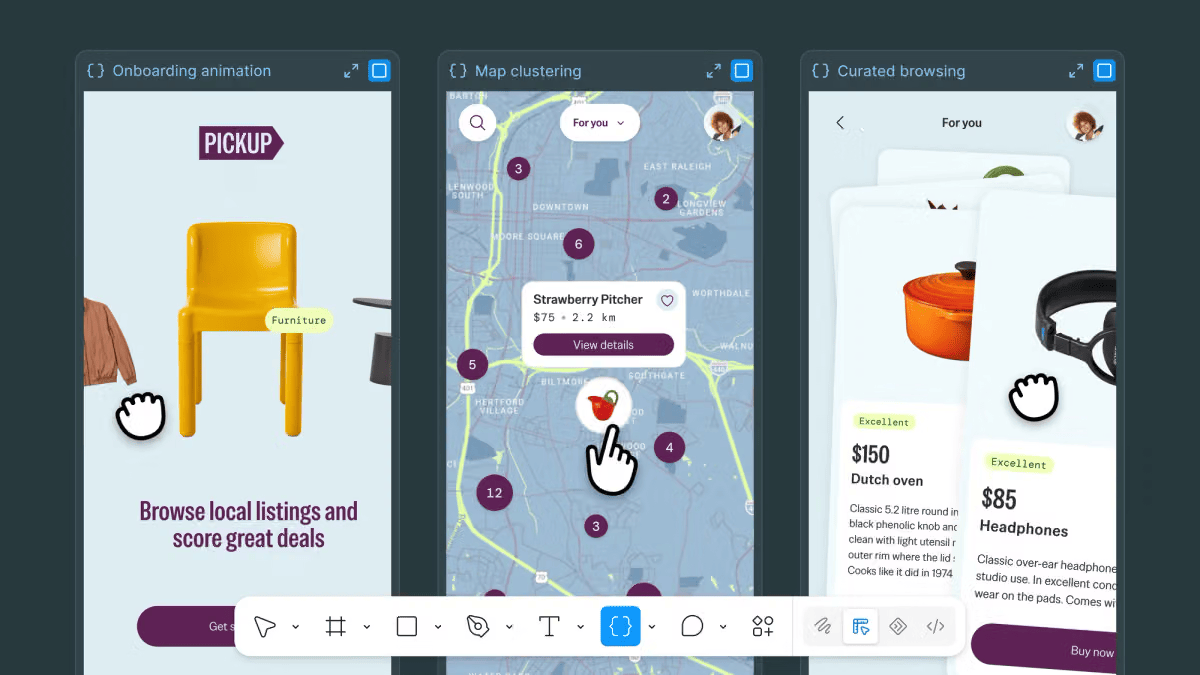
According to Figma's code layers announcement, a code layer can start from an existing Figma design, a prototype imported from GitHub or a local folder, a prototype brought in from a coding tool through Figma's MCP server, or a live web page captured with the Figma Chrome extension. Figma is careful to say that imports should be a supported, lightweight prototyping codebase, not a full production app. Screens can also be pulled back out of a code layer as editable frames with Extract designs, and changes can be pushed to a branch and reviewed as a pull request. The path between design and code now runs in both directions.
 Source: https://www.figma.com/blog/design-together-with-code-layers/
Specs live as standalone files or on the canvas, and can embed FigJam diagrams, code layers and designs (Dataconomy). Through Figma's MCP server, a coding agent given a spec link can also read the frames and code layers it points to.
17x more code, 1.3x more releases
The most revealing moment of Config India was not a feature. It was a number. Figma's Chief Design Officer Loredana Crisan said teams now produce 17 times as many lines of code as before, while releases have grown only 1.3 times (Dataconomy, reporting her comments to TechCrunch). Her explanation: much of that code is not written to ship. It is written to discover what the product should be.
That is a remarkable admission, and an honest one. AI has made code cheap enough to use as a sketching material. Teams generate a working prototype the way they used to draw a wireframe, look at it, and throw most of it away.
The bottleneck has moved. Producing options is no longer the hard part. Deciding between them, and keeping the reasons behind each decision, is. When code is abundant, context becomes scarce. Code layers make exploration faster; Specs and Guidelines are Figma's attempt to keep the thinking from getting lost in the noise.
Your design system has a new reader
For years, a design system had two audiences: designers who used the components and developers who implemented them. Config India makes a third audience official. In its Specs announcement, Figma argues that Markdown has become the default format for sharing context as teams work more with agents, but that Markdown files tend to be single-player, scattered and loosely tied to the work they describe. Specs is its answer: a shared place where written intent, designs and technical details come together to guide agents from prototype to production. Coverage of the launch framed it even more directly, as a way to document a company's design language so that agents follow brand rules more consistently (Dataconomy).
Figma's own examples point straight at design systems. At Intuit, a staff product designer working on the Intuit Design System places a spec next to a new icon set, recording each icon's file name, category, search tags and description. Figma also shows its agent documenting usage context for design system components in a spec, side by side on the canvas.
Agents read differently from people. A human designer can look at a button, notice it feels off, and ask a colleague. An agent cannot sense intent; it can only follow what is written down. Dataconomy notes that Figma's new tools are meant to steer AI toward more predictable results, precisely because AI behaves non-deterministically.
This has a practical consequence. Much of what makes a design system work today is tacit knowledge: the unwritten reason a spacing value is 12 and not 16, or why the danger colour is never used for decoration. People absorb these rules over time. Agents never will, unless someone writes them down.
That is why the quieter announcements matter most. Guidelines attach rules directly to published libraries. Code sources connect real components from GitHub or npm. The centralized design system preview bundles design libraries, code libraries and rules together (TechBooky). Read together, they describe a design system that is not a component library with documentation attached, but a body of explicit, machine-readable decisions.
We have argued before that design tokens are the shared language between design and code. Config India suggests that language now needs a third speaker in mind.
What design teams can do now
You do not need to adopt every beta to prepare for this shift. Most of the work is about making your decisions explicit, and it pays off whichever tools you use.
- Write down the why, not just the what. Next to each token and component, add one sentence on when to use it and when not to. "Use color.danger only for destructive actions" is a rule an agent can follow. A red swatch is not.
- Turn tacit rules into guidelines. List the things senior designers correct most often in reviews. Those corrections are your missing rules. Start with five.
- Keep one source of truth for tokens. If your tokens live in Figma variables, a JSON file and a CSS file that drift apart, an agent will happily learn the wrong one. Pick one source and generate the rest.
- Treat specs as living documents. As TechBooky points out, a requirement that falls out of sync with the interface still causes confusion, however neatly it is displayed (TechBooky). Give every spec an owner and a review date.
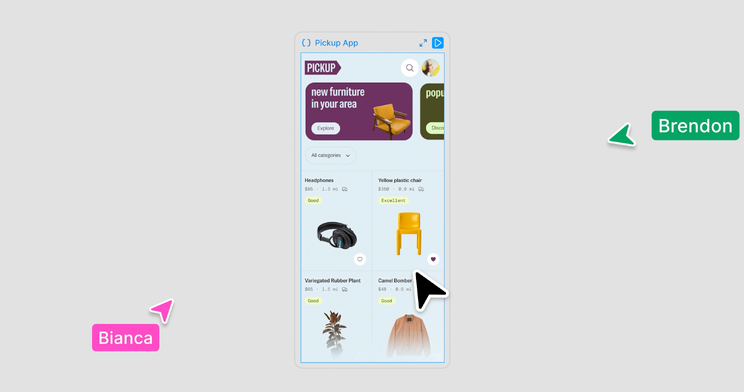
- Test with a real flow. Take a three-to-five-screen flow from a current project, turn it into a code layer and check whether your spacing, fonts and components come through cleanly. This is the test blocks&colors recommends during the free period (blocks&colors), and it quickly shows where your system is ambiguous.
 Source: https://www.figma.com/blog/design-together-with-code-layers/
A calm caveat: credits and context
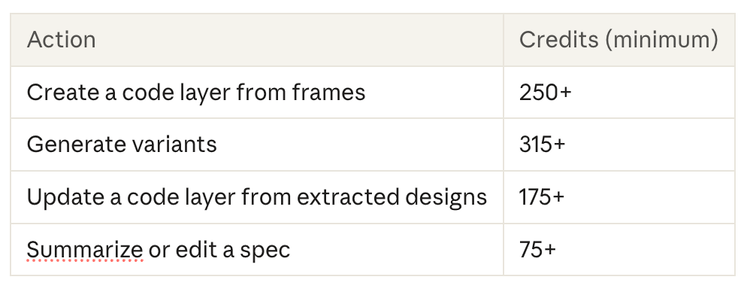
There is a less glamorous side to this launch, and it is worth naming. Code layers run on AI credits. On paid plans, creating and editing them is free until November 4, 2026 (Figma). After that, Figma's Help Center lists code layers, the Figma agent and Specs as "varies": the cost depends on the model, the complexity of the request and how much context is attached. Based on Figma's example figures, blocks&colors estimates that creating a code layer from frames starts at around 250 credits (blocks&colors).
 Source: https://blocksandcolors.de/en/blog/figma-code-layers
Approximate minimums from blocks&colors, based on Figma's Help Center examples; Figma itself says all agentic figures are approximate and may change. According to Figma's Help Center article How Figma AI credits work, a full seat includes 3,000 credits per month on the Professional plan, 3,500 on Organization and 4,250 on Enterprise. Credits are shared across Figma's AI features, reset monthly, do not roll over and cannot be transferred.
Credit-based pricing has a user-experience cost that rarely shows up in launch posts. Figma is admirably candid about it: its Help Center says that because the model decides which actions to take, the cost of a request cannot be predicted in advance. You only see what a prompt consumed after it has finished. When every exploration has a price you cannot see until afterwards, people start hesitating before they click. The tool that was meant to make discovery cheap can quietly make it stressful. Teams adopting code layers should set clear budgets and expectations early, so designers can explore without counting.
The second caveat is about context. TechBooky put it well: the measure of success will be less about how much code these tools generate, and more about how reliably teams can review, maintain and carry the result into production (TechBooky). Seventeen times more code is only progress if the reasoning behind it survives.
The quiet part of the announcement
Code on the canvas makes for a great demo, and it will get most of the attention. But the lasting change from Config India is quieter. Design decisions are becoming something you write down, not something people simply absorb.
That is good news for teams who already value clarity. A design system with explicit rules is easier for new designers to learn, easier for developers to trust, and now easier for agents to follow. The work is the same work we should have been doing all along: saying clearly what we mean, and why.
In a year when software can generate seventeen versions of anything, the calmest advantage a team can have is knowing which one is right, and being able to explain it.
Sources
- Aytun Çelebi, "Figma launches Specs to guide AI with design rules", Dataconomy, October 15, 2026.
- Paul Balo, "Figma Brings Code Layers and Specs to Config India", TechBooky, October 15, 2026.
- Team blocks&colors, "Figma Code Layers: Free on Paid Plans Until Nov 4, Then 250+ Credits per Layer From Frames", blocks&colors, October 15, 2026.
Official announcements from Figma (October 15, 2026):
- Here's everything from Config India 2026, Figma Forum
- Design together with code layers on the canvas, Figma Blog
- Introducing Specs: Markdown as a medium, Figma Blog
- Create, ship, and manage data-backed websites with Payload in Figma, Figma Blog
- Build by design: New workflows for new ways of building, Figma Blog
- How Figma AI credits work, Figma Help Center (consumption rates as of October 15, 2026)
Originally published at https://www.linkedin.com.