
Do we have to deal with the backend when building an MVP?
How Backendless and Serverless Approaches Speed Up MVP Development
 AI generated image
When building an MVP, the backend is often the part that slows everything down the most. Setting up servers, considering security, worrying about scalability… Especially in the early stages of product development, these things seriously slow things down.
Therefore, a question that teams have frequently asked in recent years is:
"Can we really do this without building a traditional backend?"
In some cases, the answer is: yes.
What Does Backendless Mean?
Backendless doesn't mean there's absolutely nothing in the background. It simply means the backend isn't managed by you. For tasks like login, data saving, file uploading, and sending notifications:
- You use ready-made services
- You proceed with APIs
- You don't touch the server
In short, the backend exists, but it's in the background and invisible.
Where Does Serverless Fit Into This?
Serverless is the technical equivalent of this approach.
The logic is simple:
- You don't set up servers
- The code only runs when needed
- You pay as you use
If there is no traffic, there is no cost. If traffic increases, the system grows automatically.
Why do people love it?
- You get started faster:
MVP is released in days.
- Lower costs:
You don't pay unnecessary server costs upfront.
- Less hassle:
You don't deal with maintenance, updates, or scaling.
That's why it's so attractive, especially for small teams and early-stage products.
In what situations is it sensible?
- If you are developing an MVP/PoC
- If you are developing MicroSaaS
- If you are developing an internal tool (admin panel, dashboard, etc.)
- If traffic is initially uncertain
- In these types of products, speed takes precedence over control.
But Everything Isn't Perfect
This job has its costs:
- You become dependent on the service you use
- You struggle with very specific needs
- Complex business rules become messy after a while
So being backendless doesn't mean "we don't think about it at all".
How to Go Backendless?
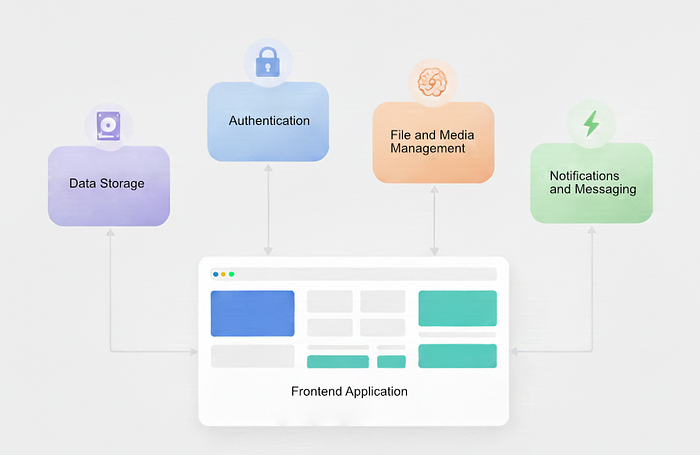
Think of backendless not as "no backend", but as a "backend as a set of managed building blocks".
 Backend as a set of managed building blocks
What you actually do is break down the responsibilities of a classic backend into smaller parts and handle each one through specialized services.
When we think of a backend, it generally consists of the following components:
- User login and authentication
- Data storage
- File uploading and access
- Business rules and background processes
- Notifications
In a backendless approach, each of these components is managed by services managed by someone else.
In practice, most teams don't use a single tool, but a combination of these managed services.
Authentication
User logins are generally one of the riskiest and most maintenance-intensive areas. In a backendless scenario, this burden is delegated to ready-made authentication services. Common examples from a company perspective:
- Firebase Authentication
- Auth0
- Supabase Auth
These services manage password security, token management, and social logins (Google, Apple, etc.) on your behalf. On the product side, they generally only deal with user ID and session information.
Data Storage (Database)
In a classic backend, database setup, backup, and scaling create a separate operational burden.
In a backendless approach, managed data services are used instead:
- Supabase Database
- Firebase Firestore
- AWS DynamoDB
Data is read and written via APIs. It does not require performance tuning or infrastructure management in the initial stage.
File and Media Management
Images, PDFs, or other files from the user go directly to managed storage services. Common examples:
- AWS S3
- Firebase Storage
- Supabase Storage
- Cloudinary
In this structure, files do not pass through the backend; the frontend uploads them directly to the service, and the application only uses the file's URL.
Business Rules and Background Operations
Simple rules can be resolved on the frontend side. In more controlled scenarios, serverless functions come into play. Solutions frequently preferred by company teams:
- AWS Lambda
- Google Cloud Functions
- Support Edge Functions
These functions only run when triggered. For example, operations like "send email if user has made a payment" are executed without a constantly running server.
Notifications and Messaging
Communication channels such as push notifications, email, or SMS can also be part of a backendless architecture. Example services:
- Firebase Cloud Messaging
- OneSignal
- SendGrid
These services generally operate event-based and can be triggered without writing backend code.
What does this approach provide?
- The product gets up and running much faster.
- Operational load is kept to a minimum.
- Production is possible with small teams.
However, this approach may require rethinking the architecture as the product matures.
The backendless approach is not about ignoring the backend; it's about postponing the burden of managing it until the product is validated.
Generally, the healthiest approach is this:
- Start with a quick launch using backendless/serverless architecture.
- Customize critical areas as the product matures.
Trying to build a perfect architecture from the beginning often ends up ending most products before they even launch.
Backendless and serverless approaches aren't magic solutions, but when used correctly, they can significantly improve speed.
The key question is:
"In this product, is speed or control more important right now?"
For most MVPs, the real risk isn't choosing the wrong architecture — it's never shipping at all.
Want to be the first to see new posts? Subscribe to get updates straight to your inbox.