
Design Tokens for Minimal Context-Switch Fatigue
How to build a three-layer token system in DTCG and Figma that eliminates context-switching friction for engineers.

Elena is a front-end engineer. It is 2:40 p.m. She has one job: change the danger button on the billing screen from #D92D20 to the new brand red.
She opens Figma. The color is a raw hex, not a variable. She opens the codebase. The button uses —red-600. She searches the repo and finds —color-danger, —btn-danger-bg, and one hard-coded #D92D20 in a legacy stylesheet. She opens Storybook. It shows yet another red. She opens the staging site in the browser to see which red is live. She opens Slack to ask which red is right. Someone replies, “Check the docs.” The docs are in a wiki. The wiki is out of date.
Forty minutes later, the fix is a one-line change. But Elena cannot remember what she was doing before she started. Her earlier task, a pull request review, is gone from her head.
Nothing broke. No one made a mistake. The cost was quieter than that. She switched context seven times to answer one question: which red?
(Elena is a composite, not a real person. The pattern is real.)
Why Switching Costs More Than Time
Working memory is small. Research puts the real limit at about three to five chunks, not the seven people often quote. Every time a developer changes tool, file, or mental model, some of those chunks fall out.
Researchers call the leftover drag “attention residue”: thoughts about the old task keep running while you work on the new one. People did worse on the second task when the first was left unfinished. That is exactly Elena’s stale pull request review.
Interruptions have a second cost. In one study, people finished interrupted work faster, but felt more stress, frustration, time pressure and effort. The task was a simulated office setting, not real developer work. Still, the pattern is a useful warning: fast is not the same as calm.
Calm technology, as its original authors framed it in 1995, keeps most information at the edge of your attention until you need it. For developers, we would state the rule this way: do not spend the user’s memory on things the system already knows. That wording is ours, not theirs.
For developers, the system knows a lot:
- Which color means “danger.”
- Which spacing step goes between a label and an input.
- Which component handles a loading state.
When that knowledge lives only in people’s heads, the team pays for it in switches. Each unanswered question sends someone to another tab.
This also matters for cognitive accessibility. WCAG 2.2 was published in October 2023 and is still the current W3C Recommendation. WCAG 3.0 is a working draft, not something to conform to yet. Two criteria in 2.2 fit our problem:
- SC 3.2.4 Consistent Identification (Level AA). Components with the same function should be identified the same way, for example with the same label. This criterion is older than 2.2.
- SC 3.3.7 Redundant Entry (Level A). It is new in WCAG 2.2. People should not have to enter information they already gave.
Both are written for end users. Applying them to developers is this article’s argument, not part of the standard. A design system is the developer’s interface, and it deserves the same rule: say a thing once, in one place, in one name.
So the goal is not speed. The goal is fewer questions per task.
The Anatomy of a Low-Switch Token System
Most token systems fail in one of two ways. They have too few layers, so raw values leak into code. Or they have too many, so no one knows which layer to use.
A calm system uses three layers. Each layer answers exactly one question.
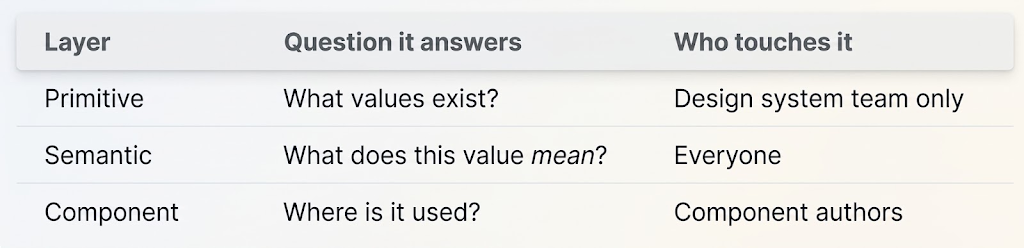
Here is the contract in JSON. It follows the Design Tokens Community Group format, version 2025.10. That is the first stable version, announced on 28 October 2025. It is not on the W3C Standards Track. Color values are objects now, with a required colorSpace and components. The hex field is an optional fallback.
{
  "color": {
    "red": {
      "500": {
        "$type": "color",
        "$value": {
          "colorSpace": "srgb",
          "components": [0.941, 0.267, 0.22],
          "hex": "#f04438"
        }
      },
      "600": {
        "$type": "color",
        "$value": {
          "colorSpace": "srgb",
          "components": [0.851, 0.176, 0.125],
          "hex": "#d92d20"
        }
      }
    }
  },
  "semantic": {
    "action": {
      "danger": {
        "bg": {
          "$type": "color",
          "$value": "{color.red.600}",
          "$description": "Destructive actions. Use for delete, remove, revoke."
        }
      }
    }
  },
  "button": {
    "danger": {
      "bg": {
        "$type": "color",
        "$value": "{semantic.action.danger.bg}"
      }
    }
  }
}
Notice the $description. It answers the question before the developer leaves the file. No Slack thread. No wiki.
Two cautions. First, Light and Dark modes are not in this file. The group’s Resolver Module covers that: it describes how to work with tokens in several contexts, such as light and dark themes. Second, tool support is uneven. Some tools still expect an earlier draft. Test an import in your own tools before you commit to the format.
The same contract in Figma uses Variables, with collections that match the layers:
- Collection
_Primitives - Collection
Semanticwith modes Light and Dark - Collection
Component
The underscore matters. Starting a collection name with _ or . keeps the whole collection out of the published team library. Designers who consume the library cannot pick red/600 directly, so they cannot skip the meaning. Figma has also announced native DTCG import and export, rolled out in stages. Check that your account has it.
The output in CSS stays flat and boring on purpose:
:root {
  --color-red-500: #f04438;
  --color-red-600: #d92d20;
  --action-danger-bg: var(--color-red-600);
}

.btn--danger {
  background: var(--action-danger-bg);
}

@media (prefers-color-scheme: dark) {
  :root {
    --action-danger-bg: var(--color-red-500);
  }
}
One more piece: the handoff boundary. Write down who owns what.
# handoff-contract.yml
design_owns:
  - semantic token names
  - visual states (hover, focus, disabled, loading)
  - spacing and type scale
engineering_owns:
  - token build pipeline
  - component API (props, events)
  - performance and bundle size
shared:
  - token descriptions
  - deprecation notices
never:
  - raw hex in product code
  - new primitives without a system PR
A boundary is a decision made once so nobody has to make it again.
Before and After: The Billing Button
Before. Elena’s task, as it happened:
- 7 tool switches (Figma, editor, repo search, Storybook, browser, Slack, wiki)
- 5 candidate reds found
- 40 minutes to complete
- 1 hard-coded hex left behind, because she ran out of energy to chase it
- 1 stale pull request review she forgot to return to until the next day
After. The same task, on a system built with the three layers above:
- She opens the code. She searches for
danger. - She finds
--action-danger-bgwith its description. - She updates the primitive. Every semantic token that points to it follows. The visual regression test shows what else moved.
- A lint rule flags the legacy hex. She replaces it with the token.
- She runs the visual regression test. It passes.
- 1 to 2 tool switches (editor, test runner)
- 1 red
- About 8 minutes
- 0 stray hex values
- Her review is still in her head
These numbers are illustrative. They come from a common pattern, not from one study. Measure your own: time-to-complete on five repeat tasks, tool switches per task, and raw values per pull request. The raw-value count is the easiest to watch, because it changes the moment a lint rule lands.
That lint rule deserves a note. It is small, but it holds the whole system up. Stylelint’s color-no-hex rule disallows hex colors. The token build output must still be allowed to contain hex, so we exempt it:
{
  "rules": {
    "color-no-hex": true
  },
  "overrides": [
    {
      "files": ["src/tokens/**/*.css"],
      "rules": { "color-no-hex": null }
    }
  ]
}
The system does not shout. It just refuses, politely, to let the old habit back in.
The Context-Switch Audit: Five Checks
Run this over one sprint. Pick your five most common developer tasks and walk them end to end.
- Count the switches. For each task, log every tool or tab change. Any task over three switches needs a fix. Start with the one that has the most.
- Hunt raw values. Search the codebase for hex colors, pixel spacing, and font sizes outside the token files. Every hit marks a place where the system did not answer a question.
- Read every token name aloud. If a name describes appearance (
blue-light-2) instead of intent (surface-info), rename it. Add a$descriptionto every semantic token. - Match Figma to code. Compare variable names in Figma with token names in CSS. They should be identical, character for character. Every mismatch is a translation step someone does in their head.
- Test the docs at the point of need. Can a developer find the token’s purpose from inside the editor (autocomplete, hover, or type hint) without opening a browser? If not, move the docs closer.
Do not fix everything at once. Fix the top offender, measure again, then move on.
The Quiet Kind of Respect
We tend to praise tools for what they add. A new panel. A new shortcut. A new alert.
But the best help is often invisible. It is the answer sitting exactly where the question appeared. It is the name that means what it says. It is the boundary that spared someone a meeting.
A developer’s attention is not a resource to be harvested. It is the thin, warm thread of their own thinking. A good design system does not pull on that thread. It keeps it whole, so that at the end of the day, a person can still remember what they came to do.
Sources & References
Research
- Cowan, N. (2001). The magical number 4 in short-term memory: A reconsideration of mental storage capacity. Behavioral and Brain Sciences, 24(1), 87–114. https://doi.org/10.1017/S0140525X01003922
- Leroy, S. (2009). Why is it so hard to do my work? The challenge of attention residue when switching between work tasks. Organizational Behavior and Human Decision Processes, 109(2), 168–181. https://doi.org/10.1016/j.obhdp.2009.04.002
- Mark, G., Gudith, D., & Klocke, U. (2008). The cost of interrupted work: More speed and stress. Proceedings of CHI ’08, 107–110. https://doi.org/10.1145/1357054.1357072
- Weiser, M., & Brown, J. S. (1995). Designing calm technology. Xerox PARC. https://people.csail.mit.edu/rudolph/Teaching/weiser.pdf
Standards and Documentation
- W3C (2023). Web Content Accessibility Guidelines (WCAG) 2.2. https://www.w3.org/TR/WCAG22/
- Design Tokens Community Group (2025). Design Tokens Format Module 2025.10. https://www.designtokens.org/TR/2025.10/format/
- Design Tokens Community Group (2025). Design Tokens Color Module 2025.10. https://www.designtokens.org/TR/2025.10/color/
- Design Tokens Community Group (2025). Design Tokens Resolver Module 2025.10. https://www.designtokens.org/TR/2025.10/resolver/
- Figma. Hide styles, components, and variables when publishing. https://help.figma.com/hc/en-us/articles/360039238193-Hide-styles-components-and-variables-when-publishing
- Stylelint. color-no-hex rule. https://stylelint.io/user-guide/rules/color-no-hex/
Notes
- Elena and the billing screen are a composite scenario. The before/after numbers are illustrative, not from a study.
- The lint and token snippets are examples to adapt, not a drop-in config.
- This article makes no legal compliance claim. Laws often reference older WCAG versions than 2.2.