
Defensive Component Design: Building Design Systems for Executive Dysfunction
Your form should assume you’ll be interrupted. The best ones make interruption safe.
1. The Tab That Closed
Meet Maya 👋 She's filling in a reimbursement form. Eleven minutes in, her phone buzzes. A colleague needs a quick answer. She gives it. Twenty minutes later, she's back at her laptop.
The session timed out. The form is empty.
Maya has ADHD. She isn't surprised. Just tired. It's the fourth time this month. So she emails the receipts to finance and hopes someone types them in for her.
Look closely at what failed. It wasn't her attention. Everyone's attention drifts. The component failed. A text field that keeps your words only until the page changes is a fragile thing. It quietly says, "Don't ever get interrupted." That's a price some people can't pay every time.
2. Forms Should Carry the Memory
Here's the calm tech idea in one line: the system should hold what the human shouldn't have to hold.
It's a simple rule, but it matters a lot here. Research on adults with ADHD finds that working memory deficits persist into adulthood. [1] Studies on children with ADHD show deficits in several parts of working memory. [2] And the W3C's cognitive accessibility guidance says it plainly: memory barriers stop people with cognitive disabilities from using content. [3]
Now think about a form. Every open question in it is a small memory job. "Did I save this?" is one. "Is this field okay?" is one. "Can I undo that?" is one. A calm interface closes those loops for you, quietly, without asking for your attention.
Three principles do the work:
- Persist by default. Saving belongs to the field. The user shouldn't have to remember a button.
- Say the state out loud, but softly. You can always see whether your work is safe. No flashing, no drama.
- Make actions reversible. Undo is a permanent part of the interface, not a toast that vanishes.
These line up with real WCAG criteria:
- 2.2.6 Timeouts (AAA). Users must be warned about how long inactivity can last before data is lost, unless the data is kept for more than 20 hours. [4] Good autosave makes the warning unnecessary.
- 3.3.4 Error Prevention (AA). It covers pages with legal or financial commitments, or pages that change or delete user data. One way to meet it is to make submissions reversible. [5] The scope is narrow, but "reversible" is a great default everywhere.
- 3.3.7 Redundant Entry (A). Information already given in the same process should be auto-filled or available to select. It doesn't apply across sessions. [6]
- 4.1.3 Status Messages (AA). Status messages need a role or property so assistive tech can announce them without moving focus. [7]
One honest note. Restoring a draft after a timeout goes beyond what 3.3.7 asks for. It comes from the cognitive accessibility guidance [3], not from a success criterion. It's still worth doing.
3. The Anatomy of a Defensive Field
Think of a defensive field as a small state machine. Every state gets its own tokens.
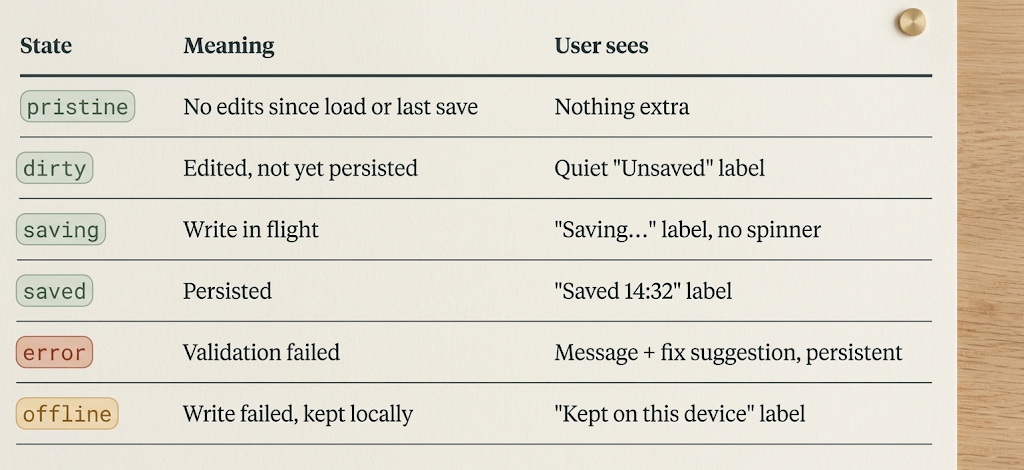
Notice what's missing: a "lost" state. If a write fails, the value goes to local storage and the field retries. The user's words never disappear.
Tokens
Name tokens by state, not by color. Theming stays safe, and your Figma variable collection stays readable.
{
  "field": {
    "status": {
      "dirty":   { "text": "{color.neutral.700}", "icon": "dot" },
      "saving":  { "text": "{color.neutral.700}", "icon": "none" },
      "saved":   { "text": "{color.success.700}", "icon": "check" },
      "error":   { "text": "{color.danger.700}",  "icon": "alert", "border": "{color.danger.600}" },
      "offline": { "text": "{color.warning.800}", "icon": "cloud-off" }
    },
    "timing": {
      "autosave-debounce": "800ms",
      "saved-label-dwell": "4000ms",
      "draft-retention": "24h",
      "undo-window": "none",
      "validation-trigger": "blur"
    },
    "motion": {
      "status-change": "0ms",
      "reduced-motion": "0ms"
    }
  }
}
Four of these choices deserve a closer look.
draft-retention: 24h. This one connects straight to 2.2.6. If you keep data for more than 20 hours, you don't need the timeout warning. [4] If your backend can't keep drafts that long, show the inactivity limit at the start of the task instead.
undo-window: none. This is our design recommendation, not a measured threshold. The logic: a timed undo assumes people notice a mistake inside the window. For people with memory barriers [3], that's a shaky bet. Use a persistent "Undo" line or version history. It also supports the "reversible" option in 3.3.4. [5]
validation-trigger: blur. Treat this as a strong default, not a law. Baymard's testing says to avoid premature validation, clear errors as soon as input is fixed, and use positive feedback. [8] Smashing Magazine's guide agrees that late validation, after the user leaves the field, almost always works better. [9] But not everyone buys it. One UX Movement critique argues that inline validation keeps pushing users between "filling" and "fixing" modes. [10] The sources disagree, so test with your own users. Our rule: validate on blur, then re-validate on input once a field is marked invalid. That way the error disappears the second it's fixed.
Status text, not status animation. A short label sits quietly in the corner of your eye. A spinner grabs it.
Figma setup
Create one variable collection called field/status, with a mode for each state. Bind the status slot to those variables with a single instance swap. Then add these component properties:
- State (variant): pristine, dirty, saving, saved, error, offline
- Status label (text)
- Helper / error text (text)
- Has undo (boolean)
Add one note for developers on the component page: "Status label lives in a polite live region. Never move focus on state change."
The code contract
<div class="field" data-state="dirty">
  <label for="amount">Amount</label>
  <input id="amount" name="amount"
         aria-describedby="amount-help amount-status"
         aria-invalid="false" />
  <p id="amount-help" class="field__help">Numbers only. Example: 128.50</p>
  <p id="amount-status" class="field__status" role="status">
    Unsaved
  </p>
</div>
The status role works like aria-live="polite" with aria-atomic="true", which fits gentle, non-urgent messages. That's why the markup needs no extra live-region attribute.
.field__status {
  color: var(--field-status-text);
  transition: none; /* motion.status-change = 0ms */
}

.field[data-state="error"] input {
  border-color: var(--field-status-error-border);
  border-width: 2px; /* don't rely on color alone */
}
interface DefensiveFieldContract {
  persist(value: string): Promise<void>;   // debounced, 800ms
  fallback: "localStorage";                // on failure, never discard
  restore(): string | null;                // on mount, offer recovered value
  history: { undo(): void; redo(): void }; // per-field, session-long
  validateOn: "blur" | "input-after-error";
  announce: "status";                      // never role="alert" for saves
  persistPolicy: "draft" | "never";        // "never" for passwords, ID numbers
}
Look at persistPolicy. The 3.3.7 guidance warns that a careless implementation could leak personal information. [6] Local fallback is for ordinary text. Sensitive fields opt out.
The handoff boundary is simple. Design owns the states, tokens, copy, and timing values. Engineering owns the persistence adapter. The component takes a persist function as a prop. It doesn't care if that hits an API, IndexedDB, or a draft endpoint.
One last rule: restore on return. When Maya comes back, the form says, "We kept your draft from 14:21," with one "Continue" button. That's it.
4. Before and After: One Reimbursement Form
Before. Seven fields and a Submit button. Validation runs only on submit. Errors show up in a banner at the top and vanish after six seconds. A 10-minute session timeout wipes everything. Deleting a row shows a five-second "Undo" toast. That's five different ways to lose work, and none of them gives a warning.
After. Each field follows the defensive contract:
- Input saves after an 800ms pause. The label reads "Saved 14:32."
- Validation fires on blur. The error stays under the field until it's fixed, and it tells you what to do: "Use a number like 128.50," not "Invalid input."
- Deleting a row leaves a persistent line: "Removed 1 row. Undo." It stays until the next edit.
- If the session expires, the draft is already stored for 24 hours. Maya returns to "We kept your draft" and one button.
Impact. I don't have published numbers for this exact pattern, and I won't make any up. Treat the table below as a set of hypotheses. Run the same task with 8 to 10 participants, including people with ADHD or memory difficulties, with and without a planned two-minute interruption. The W3C guidance also recommends involving people with cognitive and learning disabilities in research and testing. [3]
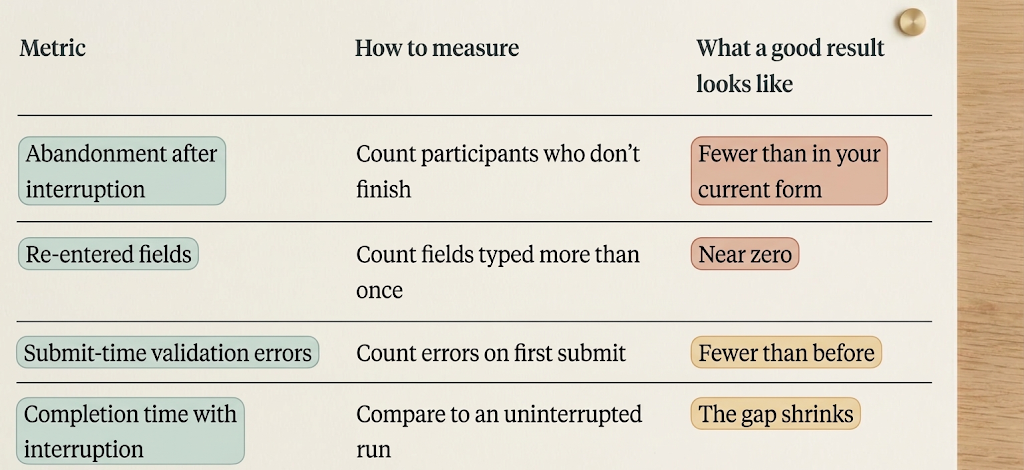
Record the numbers in your own system. Your own baseline matters more than anyone's estimate.
5. Practical Audit Checklist
Try this on your form components this week.
- Draft safety: Close the tab mid-form and reopen it. Does every non-sensitive field come back? Is draft retention above 20 hours, or is the inactivity limit shown at the start (WCAG 2.2.6)?
- State visibility: Does each field show dirty, saving, saved, and error in text, not just color or animation? Does the status use role="status" and never steal focus (WCAG 4.1.3)?
- Validation timing: Does validation run on blur, then clear on input after an error? Remove keystroke-level errors on first entry, and test the choice with real users.
- Persistent errors and undo: Do errors and undo controls stay until the user acts? Delete every auto-dismiss timer on them. For destructive or financial actions, make sure submissions are reversible, checked, or confirmed (WCAG 3.3.4).
- Token coverage: Are autosave-debounce, draft-retention, undo-window, and status-change tokens mapped to a Figma variable collection? Do sensitive fields set persistPolicy: "never"? If developers can hard-code these values, they will.
6. Closing Reflection
A good form doesn't need a perfect person. It expects a real one: someone who takes a phone call, loses the thread, and comes back tired. Software that holds your words, shows you they're safe, and lets you take things back isn't giving you special treatment. It's giving you the plain respect every user deserves.
References
- Alderson, R. M., Kasper, L. J., Hudec, K. L., & Patros, C. H. G. (2013). Attention-deficit/hyperactivity disorder (ADHD) and working memory in adults: A meta-analytic review. Neuropsychology, 27(3), 287–302. https://vufind.lboro.ac.uk/PrimoRecord/cdi_proquest_miscellaneous_1353987286
- Martinussen, R., Hayden, J., Hogg-Johnson, S., & Tannock, R. (2005). A meta-analysis of working memory impairments in children with ADHD. J Am Acad Child Adolesc Psychiatry, 44(4), 377–384. https://pubmed.ncbi.nlm.nih.gov/15782085/
- W3C. Making Content Usable for People with Cognitive and Learning Disabilities (Working Group Note). https://www.w3.org/tr/coga-usable
- W3C. Understanding SC 2.2.6: Timeouts (Level AAA). https://www.w3.org/WAI/WCAG21/Understanding/timeouts.html
- W3C. Understanding SC 3.3.4: Error Prevention (Legal, Financial, Data). https://www.w3.org/WAI/WCAG21/Understanding/error-prevention-legal-financial-data.html
- W3C. Understanding SC 3.3.7: Redundant Entry (Level A). https://www.w3.org/WAI/WCAG22/Understanding/redundant-entry.html
- W3C. Understanding SC 4.1.3: Status Messages (Level AA). https://www.w3.org/WAI/WCAG21/Understanding/status-messages
- Baymard Institute. Usability Testing of Inline Form Validation. https://baymard.com/blog/inline-form-validation
- Smashing Magazine (2022). A Complete Guide To Live Validation UX. https://shop.smashingmagazine.com/2022/09/inline-validation-web-forms-ux/
- UX Movement. Why Users Make More Errors with Instant Inline Validation. https://uxmovement.com/?p=10881
Originally published at https://www.linkedin.com.