
Bypassing the DOM: How We Built a 60 FPS GPU Playground in React
Open a new tab right now and log into the heaviest B2B SaaS tool in your daily stack. Go to the main analytics dashboard. If you are on a…
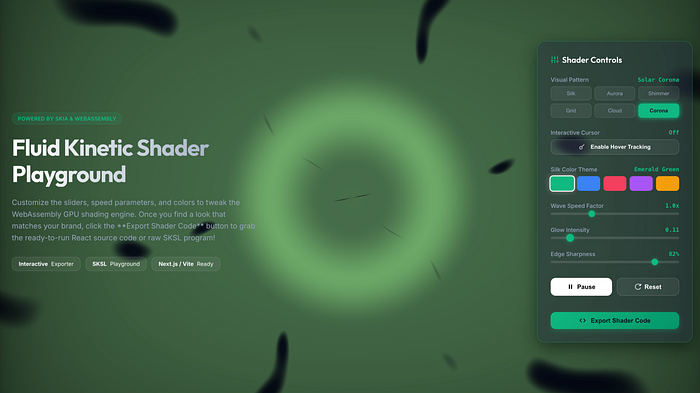 Nema Screenshot taken by author
Open a new tab right now and log into the heaviest B2B SaaS tool in your daily stack. Go to the main analytics dashboard. If you are on a laptop, pause for three seconds and listen to your cooling fans.
In modern web development, we have normalized an expensive paradox: we write hyper-optimized backend microservices in Go or Rust to fetch data in 4 milliseconds, only to hand that data over to a browser DOM that takes 120 milliseconds to figure out where to put a glowing SVG rectangle.
To us, a sluggish interface isn't just an "engineering ticket"-it is a cognitive tax on the human sitting in front of it for six hours a day. Smoothness is subconscious trust.
When we sat down to build our generative background component, we hit the classic React wall: standard CSS gradients can't compute chaos, the Canvas 2D API is too slow, and setting up raw WebGL fragment shaders inside a React component lifecycle feels like doing brain surgery with a spoon.
We wanted the raw, unthrottled math of the GPU, but we wanted it inside a simple tag. More importantly, we wanted it with zero DOM reconciliation.
So, we bypassed the browser's layout engine entirely.
Here is the architectural reality behind Nema (live at appibara.com/nema) how we mapped GLSL shaders to React state without making your CPU cry.
1. The DOM Tax vs. The Skia Engine
When you ask React to update 500 individual
or nodes 60 times a second, the main JavaScript thread simply suffocates. You get "jank".
Google's CanvasKit solves this by taking the core Skia engine-the exact C++ graphics library powering Google Chrome, Flutter, and Android-and compiling it into a standalone WebAssembly binary.
When you shift a UI layer to CanvasKit, your mental model changes to this:
State mutates --> A single Canvas tag hands a math equation to the GPU.
That is it. The browser inspector sees one blank, static HTML tag. The JS thread sits at ~3% usage drinking a coffee, while your graphics card draws 10,000 vectors inside the canvas at a locked 60 Frames Per Second.
2. The "Zero-Config" React Setup
If you have ever tried to force WebAssembly into a Next.js App Router project, you probably have a slight twitch in your left eye. The Webpack WASM loaders clash, Node tries to execute browser binaries during server pre-rendering, and your terminal bleeds red.
To make our playground strictly copy-pasteable for other developers, we refused to touch local WASM bundling. We used a simple CDN fallback.
npm install canvaskit-wasm
Here is the exact foundation of our visualizer component:
'use client'; // Required SSR shield for Next.js 13+

import React, { useEffect, useRef } from 'react';
import CanvasKitInit from 'canvaskit-wasm';

interface NemaCanvasProps {
  time: number;
  color: { r: number; g: number; b: number };
  intensity: number;
  sharpness: number;
  mouseX: number;
  mouseY: number;
}

export const NemaEngine: React.FC<NemaCanvasProps> = (props) => {
  const canvasRef = useRef<HTMLCanvasElement | null>(null);

  // 1. Store dynamic props in a mutable ref to prevent stale closures
  const propsRef = useRef(props);
  useEffect(() => { propsRef.current = props; }, [props]);

  useEffect(() => {
    let isMounted = true;
    let CanvasKit: any = null;
    let skiaSurface: any = null;
    let paint: any = null;
    let effect: any = null;
    let animationFrameId: number;

    // LERP Physics State (The "Honey Rule" detached from React state)
    let currentMouseX = 0;
    let currentMouseY = 0;

    // 2. Hardware scaling and Resize capability defined in the outer scope
    const handleResize = () => {
      if (!canvasRef.current || !CanvasKit) return;

      const canvas = canvasRef.current;
      const dpr = window.devicePixelRatio || 1;
      const rect = canvas.getBoundingClientRect();
      const targetWidth = Math.floor(rect.width * dpr);
      const targetHeight = Math.floor(rect.height * dpr);

      // Recreate surface only if dimensions changed
      if (canvas.width !== targetWidth || canvas.height !== targetHeight) {
        canvas.width = targetWidth;
        canvas.height = targetHeight;

        if (skiaSurface) {
          skiaSurface.delete();
          skiaSurface = null;
        }
        skiaSurface = CanvasKit.MakeCanvasSurface(canvas);
      }
    };

    CanvasKitInit({
      locateFile: (file) => `https://unpkg.com/canvaskit-wasm@0.41.1/bin/${file}`,
    }).then((ck) => {
      CanvasKit = ck;
      if (!isMounted || !canvasRef.current) return;

      // 3. Unified SKSL core (using 'half4' for Skia strict compliance)
      const shaderCode = `
        uniform float time;
        uniform vec2 resolution;
        uniform vec3 baseColor;
        uniform float intensity;
        uniform float sharpness;
        uniform vec2 mouse;

        half4 main(vec2 coord) {
          vec2 st = coord.xy / resolution.xy;
          vec3 canvasColor = vec3(0.05, 0.09, 0.16); // Slate 900 base

          vec2 p = st * sharpness - (mouse / resolution.xy);
          float wave = sin(p.x * 4.0 + time * 0.5) * cos(p.y * 4.0 + time * 0.3);

          canvasColor += baseColor * smoothstep(0.4, 0.45, wave) * intensity;
          return half4(canvasColor, 1.0);
        }
      `;

      effect = CanvasKit.RuntimeEffect.Make(shaderCode);
      if (!effect) return;
      paint = new CanvasKit.Paint();

      // Initialize surface dimensions
      handleResize();
      window.addEventListener('resize', handleResize);

      // 4. The unthrottled GPU render loop
      const renderLoop = () => {
        if (!skiaSurface || !isMounted) return;
        const p = propsRef.current;

        // Execute LERP Physics (10% drag distance per frame)
        currentMouseX += (p.mouseX - currentMouseX) * 0.1;
        currentMouseY += (p.mouseY - currentMouseY) * 0.1;

        // Pack state into a hardware-friendly Float32 buffer
        const uniforms = new Float32Array([
          p.time,
          canvasRef.current!.width,
          canvasRef.current!.height,
          p.color.r, p.color.g, p.color.b,
          p.intensity,
          p.sharpness,
          currentMouseX, currentMouseY
        ]);

        const shader = effect.makeShader(uniforms);
        paint.setShader(shader);

        skiaSurface.getCanvas().drawRect(
          CanvasKit.XYWHRect(0, 0, canvasRef.current!.width, canvasRef.current!.height),
          paint
        );

        skiaSurface.flush();
        shader.delete(); // GC: Sweeping pointers.

        animationFrameId = requestAnimationFrame(renderLoop);
      };

      renderLoop();
    });

    return () => {
      isMounted = false;
      window.removeEventListener('resize', handleResize);
      cancelAnimationFrame(animationFrameId);
      if (skiaSurface) skiaSurface.delete();
      if (paint) paint.delete();
      if (effect) effect.delete();
    };
  }, []);

  return <canvas ref={canvasRef} style={{ width: '100%', height: '100%', display: 'block' }} />;
};
⚠️ A quick tap on the shoulder: The WASM Memory Trap
In JavaScript, we are spoiled by the Garbage Collector. In WebAssembly, you are back in C++ territory. If you call makeShader() inside a 60 FPS draw loop and forget to manually type shader.delete(), your React component will silently leak ~120MB of VRAM per minute until the browser tab drops dead. Always sweep your pointers.
3. Designing the 6 Domains
To turn this into a true playground, we authored 6 distinct generative SKSL shaders. We didn't want laser beams; we wanted the visual equivalent of heavy, dark fabric moving inside a slow current.
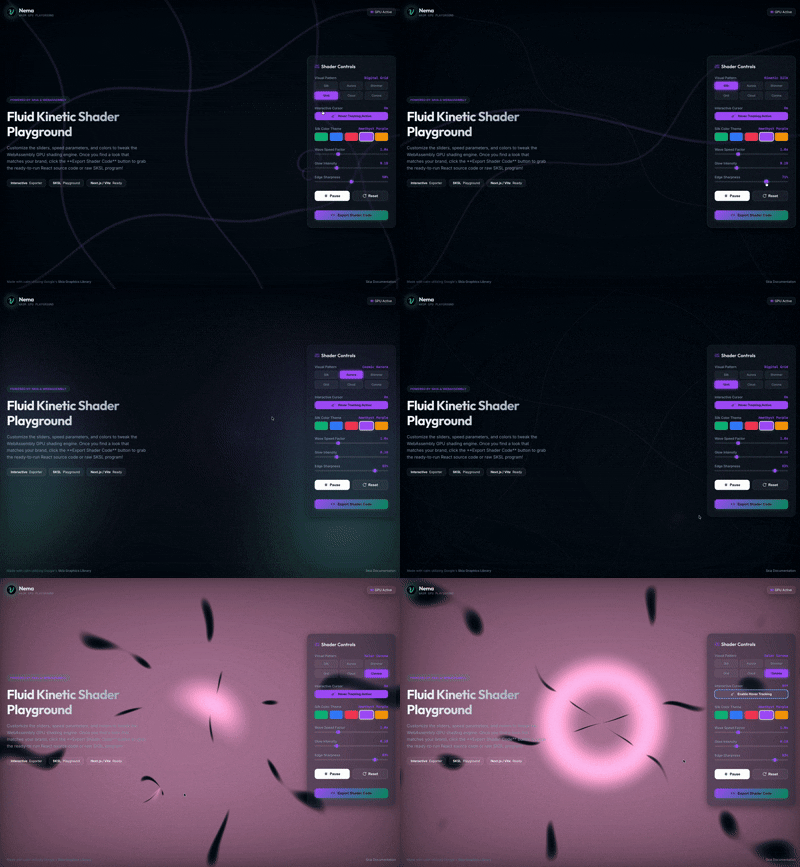 6 domains: appibara.com/nema
The math behind the aesthetics:
- Mode 0: Kinetic Silk →→ 2D matrix domain rotation modulated by time.
- Mode 1: Cosmic Aurora →→ Multiplied intersecting sine waves masking a multi-stop color vector.
- Mode 2: Liquid Shimmer →→ Iterative coordinate warping loop (mathematical caustics approximation) rather than expensive cellular Voronoi noise. By recursively offsetting the X and Y coordinates with time-animated sine and cosine functions, it creates self-overlapping wave interference patterns.
- Mode 3: Digital Grid →→ Periodic trigonometric coordinate generation (using absolute sin() and cos() waves) passed through a steep smoothstep() threshold.
- Mode 4: Cosmic Cloud →→ Multi-octave fractional Brownian motion (fBm) approximation using scaled, rotated trigonometric pseudo-noise (absolute sine-of-sine octaves).
- Mode 5: Solar Corona →→ Cartesian to Polar conversion (r,θ) warped by high-frequency angular noise vectors.
4. The "Honey Rule" (LERP Physics)
When developers hook window.onmousemove coordinates directly into a GPU shader uniform, the visual snaps to the cursor instantly. It feels frantic. It feels like a 2004 Flash website.
We detached the mouse from the math using Linear Interpolation (LERP) inside the native render loop:

By forcing the shader coordinates to only cover 10% of the remaining distance to the actual cursor per frame, the math lazily drags behind the user. It transforms erratic mouse wiggling into a heavy, premium liquid resistance-like pulling a wooden spoon through thick honey. Smoothness over responsiveness.
5. The Dual-Export Engine: Agnostic Portability
A playground is fundamentally a vanity project unless the engineer playing with it can actually steal the code on their own terms.
When we designed the export architecture at Nema, we realized that forcing a single export paradigm creates an artificial friction wall. A pragmatic React developer shipping a landing page tomorrow morning has an entirely different workflow than a Native graphics engineer optimizing a mobile pipeline.
So, we bypassed the "framework lock-in" and built a Dual-Pipeline Exporter:
┌──► [ Tab A: Standalone .tsx ] ──► (Next.js / Vite / Remix)

[ NEMA PLAYGROUND ]

└──► [ Tab B: Raw SKSL String ] ──► (Flutter / Native iOS / WebGL)
Option A: The "Drop-In" React Component
(Targeting: Pragmatic web developers wanting 60 FPS out of the box)
Clicking the React Component tab yields a fully autonomous, self-contained .tsx file. The custom SKSL string is pre-baked inside, wrapped in our CDN auto-loader:
CanvasKitInit({ locateFile: (file) => `https://unpkg.com/...` })
It hands you the complete infrastructure: the dynamic window.devicePixelRatio canvas sharpener, the LERP "honey-drag" cursor physics, and the mandatory shader.delete() garbage collection hook. Drop it into Next.js, Vite, or Remix. Zero Webpack config ejecting required. Strictly copy, paste, and ship.
Option B: The Raw SKSL Core
(Targeting: Shading purists, Flutter, Native Android/iOS, and Three.js architects)
Clicking the Custom SKSL Code tab strips away all JavaScript, React lifecycles, and DOM nodes, handing you purely the hardware-accelerated C-dialect fragment shader:
uniform float time;
uniform vec2 resolution;
// purely the raw mathematical matrix...
If you are building a custom FragmentProgram in Flutter, rendering native Skia views in Swift/Kotlin, or mapping procedural caustics onto a Three.js WebGL mesh, you simply grab the mathematical heart of the canvas and drop it into your own rendering pipeline.
We computed the math; you own the pipeline.
The Studio Takeaway
We need to stop trying to build high-velocity instrumentation panels using web technologies designed for rendering static text documents in 1995.
If your frontend team is currently spending more hours writing convoluted useMemo dependency arrays just to keep a dashboard chart from freezing the browser: stop trying to fix the document. Start drawing the picture.
Test the 6 mathematical domains, inject your exact brand palette, and generate your standalone React component at [Nema]
At Appibara, we architect and build high-performance web applications for global B2B SaaS teams. To discuss custom projects or product architectures that don't suffocate the browser, reach out to our team on LinkedIn or send your project briefs to contact@appibara.com.
#Software Engineering #React #WebAssembly #Flutter #Web Performance #Skia
Originally published at https://www.linkedin.com.